
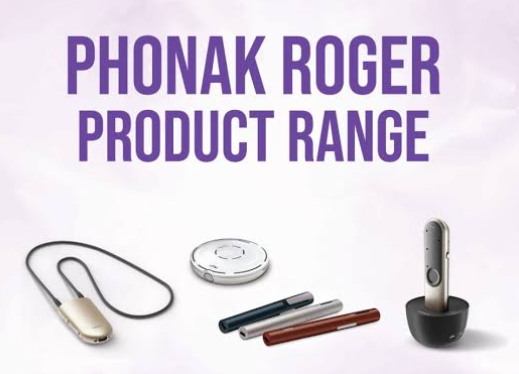
Hearing aids make every day listening easier, but conversations can still be hard to follow in some situations. In places like a busy restaurant, a family gathering, a meeting at work, or when someone is speaking from across the room. In situations like this, the background noise and distance can make speech harder to pick out, even when you are wearing your hearing aids.
This is where Phonak Roger™ technology can provide extra support.
Key Takeaways:
- What is Phonak Roger?
- Why might you need extra support alongside hearing aids?
- How does Phonak Roger work?
- Where could a Roger microphone help?
- Which Phonak Roger microphone is the right fit for you?
- Will Phonak Roger work with your hearing aids?
- Which Roger should you choose?
- Find the right Phonak Roger accessories
What is Phonak Roger?
Hearing aids make everyday listening easier; however, you may still find situations where conversations are difficult to follow. At a family gathering, socialising can be hard; at a busy restaurant, hearing can be an issue; at a meeting at work, it can be hard to hear someone speaking from across the room. Rather than relying only on the microphones built into your hearing aids, you can position the Roger Technology microphone closer to the speaker.
This will help to ensure that the effect of distance and surrounding noise is reduced, making speech easier to follow when you are in a challenging listening situation. Phonak describes Roger wireless microphones as suitable for social, work and educational environments where noise or distance can make communication harder.
Why might you need extra support alongside hearing aids?
Modern hearing aids are designed to support speech understanding in many day-to-day environments, but some listening situations are naturally more difficult.
Background noise: When several people are talking at once, your hearing aids have to process many sounds from different directions.
Distance: The further you are away from someone, the quieter their voice becomes compared with the noise around.
Group conversations: At a table or family gathering, the speaker can change quickly, making conversations harder to follow.
Poor room acoustics: Larger rooms, restaurants and meeting rooms can create echoes and competing sounds.
The Roger technology is designed to help in these situations by placing the microphone closer to the sound you want to hear.
How does Phonak Roger work?
It is simple technology but a really useful one. The Roger microphone picks up the speaker’s voice and wirelessly sends the audio to your compatible hearing aids or hearing device.
Depending on what hearing aids you use, this connection can work through RogerDirect™ or a compatible Roger receiver. RogerDirect allows compatible Phonak hearing aids to receive the signal from a Roger microphone once the Roger receiver has been installed, without needing an external receiver attached to the hearing aid. Any other hearing aids and cochlear implants can use options such as Roger X or Roger NeckLoop where appropriate. Phonak states that Roger receivers are designed to connect Roger microphones with a wide range of hearing aids and cochlear implants.
Where could a Roger microphone help?
- Busy restaurants and cafes: Restaurants are one of the most common places where, if you are wearing hearing aids, you can struggle. Conversations, background music, cutlery, and other customers all compete for attention. If you have a Roger microphone placed on the table, it can bring the voices you want to hear closer to your hearing aids.
- Family gatherings or social events: When you are around many people talking around a table or across a room, Roger can help you focus more clearly on the conversation you want to follow.
- One-on-one conversations: A Roger microphone can be worn by the person speaking, helping the speaker’s voice reach your hearing aids more directly. This can be useful when you are walking together, travelling or speaking in a noisy place.
- Meetings and presentations: Roger microphones can also support workplace communication; let’s say you place the microphone on a meeting table or wear it during a presentation. Phonak specifically positions the Roger Table Mic for meetings, conference rooms and situations involving multiple speakers.
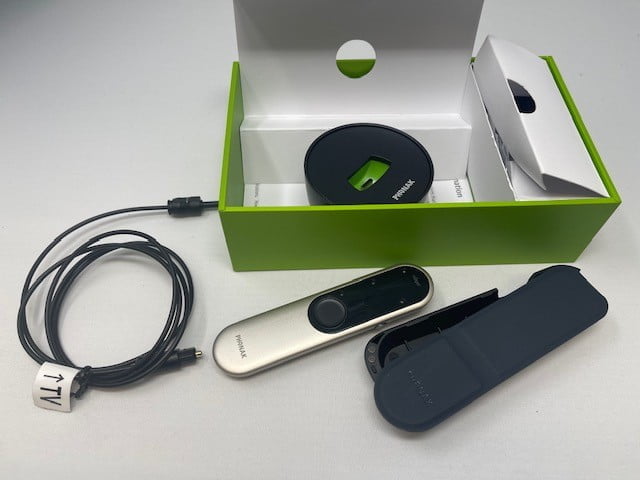
- TV and multimedia: Some Roger devices connect to televisions and other audio sources, giving you much better ways to stream sound to compatible hearing devices.
Which Phonak Roger microphone is right for you?
To answer this question, the best option depends on where you need the most support.
Roger On 3: This is one of the most flexible options in the Roger range. It includes Table, Pointing and Presenter microphone modes. Place it on the table, and it can identify speakers and move between them. You can also point it toward the person you want to hear, or have a speaker wear it during a presentation or conversation. Roger On 3 may suit you if you regularly move between restaurants, meetings, group conversations and one-to-one situations.
Roger Select 3: This is designed particularly well for stationary situations where several people are speaking around a table; it automatically selects the person speaking and switches between the speakers. If several conversations are happening at once, you can manually choose the direction you want to hear. This makes it a useful option for family meals, group conversations and social occasions.
Roger Table Mic 3: This has a stronger workplace focus. If you place it in the centre of a meeting table, it will automatically follow different speakers. You can also connect multiple Roger Table Mic devices for larger meetings and conference settings. If your main listening challenge is when you are in meetings, this may be the Roger product worth considering first.
Roger Clip-on Mic: This is designed mainly for one-on-one conversations; the person you want to hear wears the microphone, which transmits their voice directly to your compatible hearing device. Phonak positions this device as a straightforward option for people who are new to assistive hearing technology.
Will Phonak Roger work with my hearing aids?
The compatibility depends on your hearing aid model and the Roger setup you are using. There are some Phonak hearing aids support RogerDirect, while other devices require a Roger receiver. Receiver options include Roger X and Roger NeckLoops, and Roger systems can also work with many hearing aids and cochlear implants from other manufacturers when the correct receiver is used; always check compatibility before you place an order.
If you’re unsure which Roger technology suits your hearing aids, speak with our Hearing Aid Accessories team, share the make and model of your hearing aids, and we can help you find the right option.
Which Roger should you choose?
As a simple starting point, here are a few Rogers as follows:
- Roger On 3: For varied everyday situations, restaurants, meetings and conversations.
- Roger Select 3: For group conversations around a table.
- Roger Table Mic 3: For meetings, conferences and workplace use.
- Roger Clip-On Mic: For one-to-one conversations.
Consider your hearing aid model, listening needs, and receiver requirements before ordering it.
Find the right Phonak Roger accessories
The Phonak Roger technology is designed to give your hearing aids extra support when noise, distance or multiple speakers make conversations more difficult. At Hearing Aid Accessories, you can browse Roger microphones, receivers and compatible accessories for your hearing device. If you already know which Roger product you need, you can shop online, but if you feel unsure about compatibility, our team can help you check before ordering.
What is Phonak Roger used for?
Phonak Roger is a wireless microphone system designed to help hearing aid and hearing device users hear speech more clearly in situations where background noise or distance makes listening difficult.
Does Phonak Roger replace hearing aids?
No, Roger is designed to work alongside compatible hearing aids or hearing devices. The microphone picks up speech closer to the speaker and transmits it to your hearing device.
Does Roger work with all Phonak hearing aids?
Not every Phonak hearing aid connects to Roger in exactly the same way. Some support RogerDirect, while others may require a compatible receiver. Check your exact hearing aid model before purchasing.
What is RogerDirect?
RogerDirect allows compatible hearing aids to receive audio from a Roger microphone after the Roger receiver has been installed, without an external receiver attached to the hearing aid.
Does Phonak Roger work with other hearing aid brands?
Roger can work with many hearing aids and cochlear implants from different manufacturers when an appropriate Roger receiver is used.
What is the difference between Roger On 3 and Roger Select 3?
Roger On 3 offers several microphone modes, including Table, Pointing and Presenter modes. Roger Select 3 is more focused on stationary group conversations and lets you manually choose which direction to listen to when several conversations are taking place.
Do I need a Roger receiver?
This depends on your hearing aids. Some compatible Phonak hearing aids use RogerDirect, while other hearing devices require a separate Roger receiver such as Roger X or Roger NeckLoop.